Think of your Odoo system as a house you live in. A new version is a renovation. Some of the work is paint: small, visible, pleasant. Some is plumbing: behind the walls, and worth checking before you move back in.
So what does Odoo 20 bring if you run Apps Store modules or custom code? The official release notes are very long, and most of them won't touch your modules. This post sorts the changes into paint and plumbing. For the full feature list, see our Odoo 20 new features guide.
Odoo 20 Changes at a Glance
Area | What changed (per the release notes) | Worth checking if you use... |
AI | Agents can create and update records; MCP connectivity; all AI features need IAP credits | AI features |
Access rights | Record rules removed; domain added to access rights | Custom security, modules with their own rules |
Chatter tracking | Tracking values removed; message generated on the fly | Reports or code that read tracking values |
Icons and screens | Font Awesome replaced by Material Symbols | Modules with their own icons or views |
Accounting | Asset models → depreciation models; account groups → parent accounts; "In Process" → "Paid" and "Paid" → "Reconciled" | Asset, reporting, or import setups |
Payroll | Work entries removed; work entry types merged with time off types | Payroll modules |
Apps | Field Service → Planning; Remote Work → Employees | Modules built on those apps |
Which rows matter to you is our reading, not Odoo's statement.
Will My Odoo Modules Work in Odoo 20?
This is the question most people really have, and the honest answer is: it depends on each module and its publisher. The release notes describe what changed in Odoo itself. They can't tell you how a specific module behaves.
Three things decide it:
- Does the publisher support Odoo 20? Ask them, or check the module's listing.
- Does the module touch the areas in the table? If so, it deserves a closer look.
- Does it pass a test on a copy of your database? That is the only way to be sure.
The Plumbing: Where We'd Look First
None of these means something will break. They are simply the places where a quiet change costs the most if missed.
Access rights. The notes say record rules are removed and a domain is added at the access-right level instead, as Odoo's release notes describe. Security is like the locks on your doors: you wouldn't change them without checking every key still works. If a module ships its own rules, start here.
Chatter tracking. Tracking values are removed, and the tracking message is generated on the fly. Admins who still need the values can install a dedicated module. Picture a notebook that used to store every change in a table and now writes a summary when you open it. Anything that read the old table, like a custom report, needs a second look.
Icons and screens. Font Awesome icons are replaced by Material Symbols, and the notes mention redesigned dialogs and labels. This is a visual check. Open your module's screens and see whether they still look right.
Renamed and merged items. Renamed labels are easy to miss. A report that filters by "Paid" now means something different. Field Service now lives in Planning, and Remote Work in Employees. If a module sits on top of one of these, check how it fits the new structure.
One thing worth knowing: changes that only rename something are the easiest to miss. When "Paid" starts meaning what "Reconciled" used to mean, nothing looks broken on screen, but a report or filter built on the old label can quietly show different results. That's why we'd check renamed items before the big structural ones.
The Paint: Good News for Everyday Users
Some changes just make daily work nicer, according to the notes:
- Chatter filter: focus on conversations or tracked changes.
- Offline mode: create, edit, archive, and delete records while offline.
- Multi-record drag and drop: reorder several records at once.
- Incremental edits on durations: typing "+=2" on a 10h duration makes it 12h.
- Link to current search: share a link that keeps your filters and grouping.
None of these asks anything of your modules.
How to Check Your Modules Before Upgrading
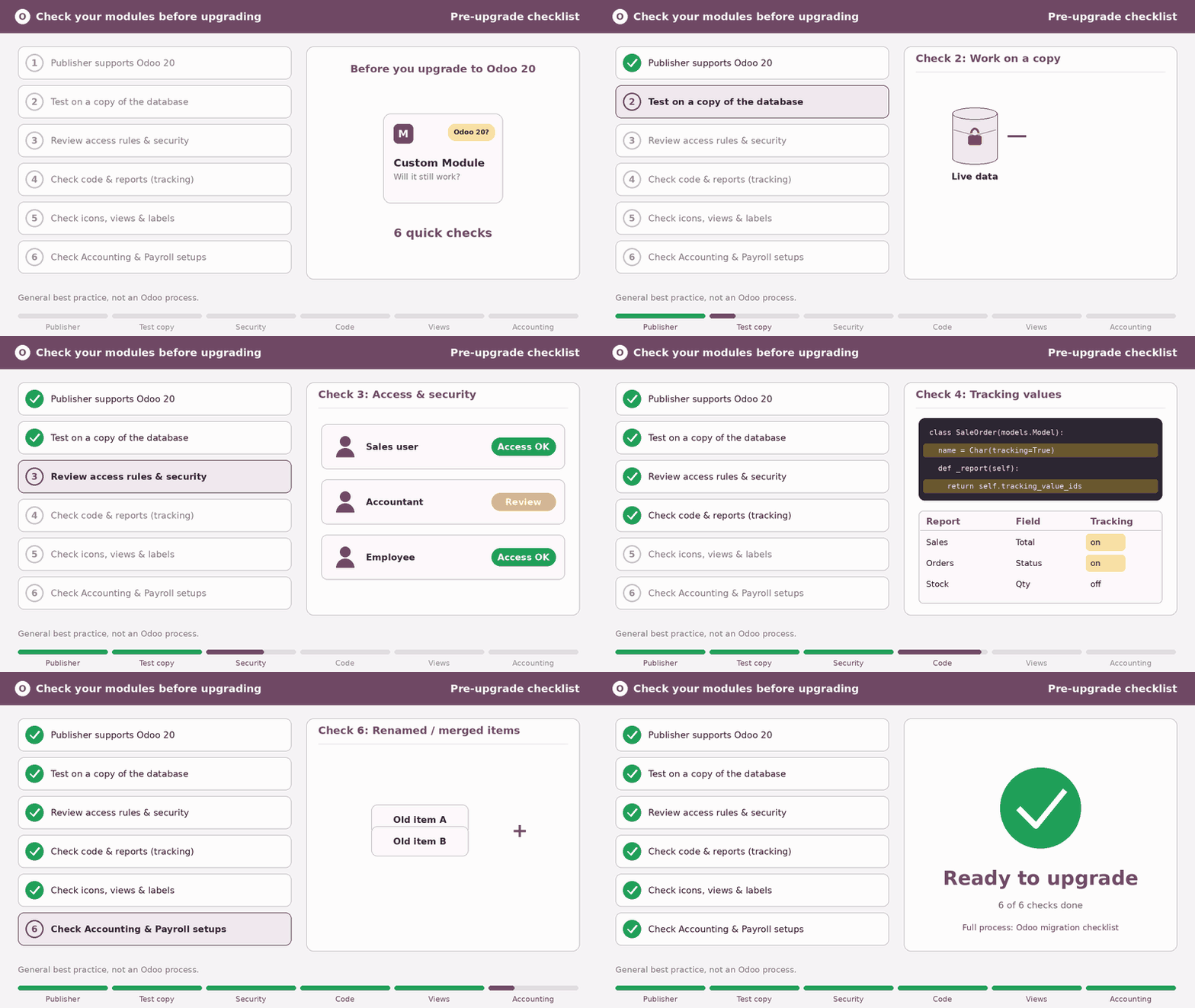
Should You Upgrade Now?
Our opinion: it depends on what you run. If your system is stable, your modules are confirmed for Odoo 20, and you have a real reason to move, planning an upgrade makes sense. If key modules aren't confirmed yet, waiting is reasonable. Our Odoo 19 vs Odoo 20 comparison walks through the decision.
Final Thoughts
Odoo 20 brings a lot, but not all of it touches you. For module owners, access rights, tracking, icons, and the accounting and payroll changes deserve the most attention. Check them, test on a copy, and confirm support with each publisher. Creyox publishes modules on the Odoo Apps Store. If you'd like a second pair of eyes on your setup, get in touch and we'll talk it through.
Frequently Asked Questions
Per the release notes: AI agents, a reworked Accounting structure, Field Service merged into Planning, removed record rules, and many everyday improvements. Which ones matter depends on what you run.
It depends on each module and its publisher. The release notes can't say how a specific module behaves. Confirm support with the publisher and test on a copy of your database.
Possibly. The notes list changes to access rights and tracking values that are worth checking. Test on a copy to find out.
It depends on your setup. If you use Field Service, want AI agents, or face new compliance work, it may be. See our comparison post for the full decision.
The Technical section lists tracking values removed, push notifications moved off Firebase, and improved many-to-one fields. Removed record rules and the new icon set are also worth reviewing.