Since 5 October 2026, the electronic DeCA has been mandatory for applicable road freight operations in Spain. Resolution BOE-A-2026-12784 sets out its technical characteristics. For logistics teams, this turns a familiar paper-era document into a question of data, systems and dispatch speed.
If you have been searching for “DeCA obligatorio” (mandatory DeCA), here is the short version: the electronic DeCA has been required for applicable road freight operations since that date. Whether your own operations are covered is something to confirm with your legal or transport advisor.
Transport managers, warehouse leaders and IT teams now need a reliable way to issue a valid document for every covered shipment, keep it consistent with what is actually loaded, and update it when something changes on the road. If your operation already runs on Odoo, the most practical answer is to issue the DeCA where the delivery data already lives.
That is why Creyox Technologies built Spain DeCA Road Transport Document, an Odoo DeCA module that lets you generate DeCA from Odoo delivery orders, with the checks, numbering, sealing and verification that dispatch teams need. This guide explains what the module does and how to get started.
What Is the DeCA and Why Does it Matters for Logistics Teams?
The DeCA is an electronic administrative control document for road freight transport in Spain. In plain terms, it is the digital record that accompanies applicable shipments and that inspectors can check at the roadside. Resolution BOE-A-2026-12784 defines its technical characteristics.
It affects the parties involved in applicable road freight operations: shippers who dispatch goods, carriers who move them, and the warehouse and logistics teams who prepare the load. Who exactly is covered, and in which cases, depends on the details of each operation.
Please confirm your specific obligations with your legal or transport advisor. This article is general information about a software module, not legal advice.
The case for issuing the document from existing delivery data is simple. Most DeCA information already exists in your ERP: the shipper, the carrier, the products, the quantities and the weights. Re-typing it into a separate portal or spreadsheet creates opportunities for mismatches between the document and the real load. Issuing from the delivery order means a single source of truth, fewer manual steps and less time at the dock.
Key Features of the Spain DeCA Road Transport Document
This Odoo Spain road transport document module is designed to support the DeCA requirements across the whole lifecycle of a shipment, from creation to inspection to changes in transit.
Issue from Delivery Orders
Open an outbound delivery order and use Generate DeCA to create the document from the data already there. You then review parties, plates and cargo, and use Sync Lines to align the cargo lines with the delivery before issuing. No re-keying and no separate tool.
Grouped DeCA (Envíos Agrupados)
When several deliveries travel with the same carrier, you can combine them into one grouped DeCA (envíos agrupados) rather than creating a separate document for each. This keeps paperwork aligned with how loads are actually organised.
Pre-Issue Checks for Tax IDs, Plates and Weights
Before a DeCA is issued, the module checks shipper and carrier tax IDs, the truck plate and the weights. Problems surface while the team can still fix them quickly, not after the vehicle has left.
Official Sequential Numbering (DECA/YYYY/NNNNN)
Each issued document receives an official sequential number in the format DECA/YYYY/NNNNN, assigned automatically so nobody has to track numbers by hand.
SHA-256 Sealed PDF with One-Click Integrity Check
On issue, the PDF is sealed with a SHA-256 hash, making it tamper-evident. With Verify Integrity, anyone with the right access can check at any time that the document has not been altered since it was issued.
Public QR Verification Without Login
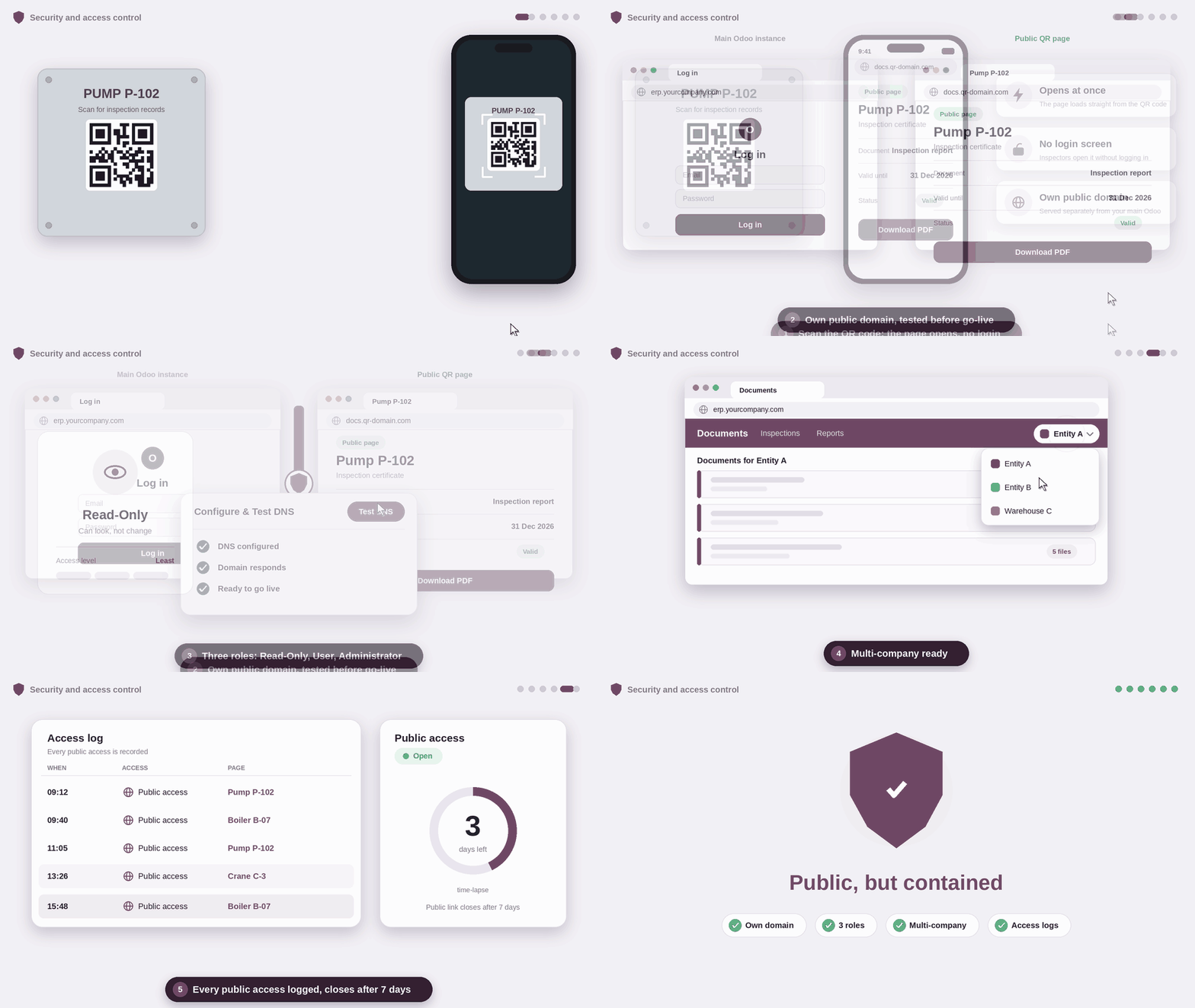
Each DeCA carries a QR code linked to a public page. DeCA QR verification means a roadside inspector can scan the code and open the document without logging in to your ERP. The public page runs on a dedicated domain, so your main Odoo system stays private.
Inspection Access Logs and 7-Day Auto-Closure
Every access through the public link is recorded in the Public Download Logs, giving you visibility into when and how the document was opened. Public access closes automatically after 7 days, limiting exposure once the shipment is complete.
Method A: In-Route Changes
Plans change on the road, for example when a vehicle is swapped mid-trip. With Modify in Route (Method A), you update the document and keep a visible history of what changed and when.
Method B: Reissue
When a change calls for a new document, Reissue DeCA (Method B) creates a replacement that is linked to the original, so the chain of documents stays clear and traceable.
Inbound Receipt Archiving
The module also supports archiving documents on inbound receipts, helping you keep related records together instead of scattered across inboxes and shared folders.
Security and Access Control
Benefits for Your Business
- Faster dispatch paperwork. The DeCA starts from data already in the delivery order, so there is less typing and fewer steps before a truck can leave.
- Fewer data errors. Checks on tax IDs, plates and weights run before issuing, not after.
- A clear audit trail. Official numbering, sealed PDFs, integrity checks, change history and access logs sit in one system.
- Support for changes during transport. Method A and Method B give your team a structured way to handle in-route modifications and replacements.
- One system instead of many. Your team works in the Odoo environment it already knows.
Who Should Use This Module
The module is built for businesses in Spain that run Odoo Inventory and need to issue the DeCA as part of their road freight operations:
- Carriers that move goods and need to manage vehicles, trailers and documents
- Shippers and manufacturers that dispatch goods from their own warehouses
- Distributors and wholesalers with frequent outbound deliveries
- Logistics providers that coordinate loads for multiple clients
If your team ships by road in Spain and manages deliveries in Odoo, this is the kind of workflow the module is meant to support.
How to Get Started
- Install the module from the Odoo Apps Store. It depends on Inventory and Discuss.
- Assign roles (Read-Only, User or Administrator) to your team.
- Set the public domain for QR verification and run Configure & Test DNS.
- Enable Generate DeCA on your delivery operation type.
- Register carriers and vehicles. Mark contacts as DeCA Carriers and add their vehicles and trailers.
- Issue your first document from a delivery order and check the number, QR code and sealed PDF.
We recommend trying the process with sample data first, so your team feels confident before using it on live shipments.
Frequently Asked Questions
It is the electronic administrative control document for applicable road freight operations, mandatory since 5 October 2026.
Yes. With this module, you generate the DeCA directly from outbound delivery orders.
Yes. Spain DeCA Road Transport Document by Creyox Technologies is an Odoo module designed to support the DeCA requirements.
Yes. The public QR link opens without login, and each access is logged.