Why your Odoo website needs Cloudflare verification
Every public-facing Odoo website whether it runs an eCommerce store, a corporate site, or a customer portal is exposed to the same threats that every web application faces: automated bots submitting spam through contact forms, credential stuffing attacks targeting the login page, mass account creation scripts hitting the signup form, and brute-force attempts probing the password reset flow. Odoo's default setup provides no built-in CAPTCHA layer across these pages, meaning any bot with a basic script can target them freely.
The consequences are practical and immediate spam contact submissions flooding inboxes, fake accounts polluting the customer database, and login endpoints being hammered without any friction. Adding Cloudflare Turnstile verification to these pages is the standard solution, but without a dedicated Odoo Cloudflare connector it requires custom development and direct template edits that most Odoo implementations cannot maintain easily. The Odoo Cloudflare Integration module by Creyox solves this with a clean, no-code configuration layer that adds Cloudflare verification to your Odoo website pages through a simple settings interface no template editing, no developer involvement, no compromise to usability or page performance.
Overview
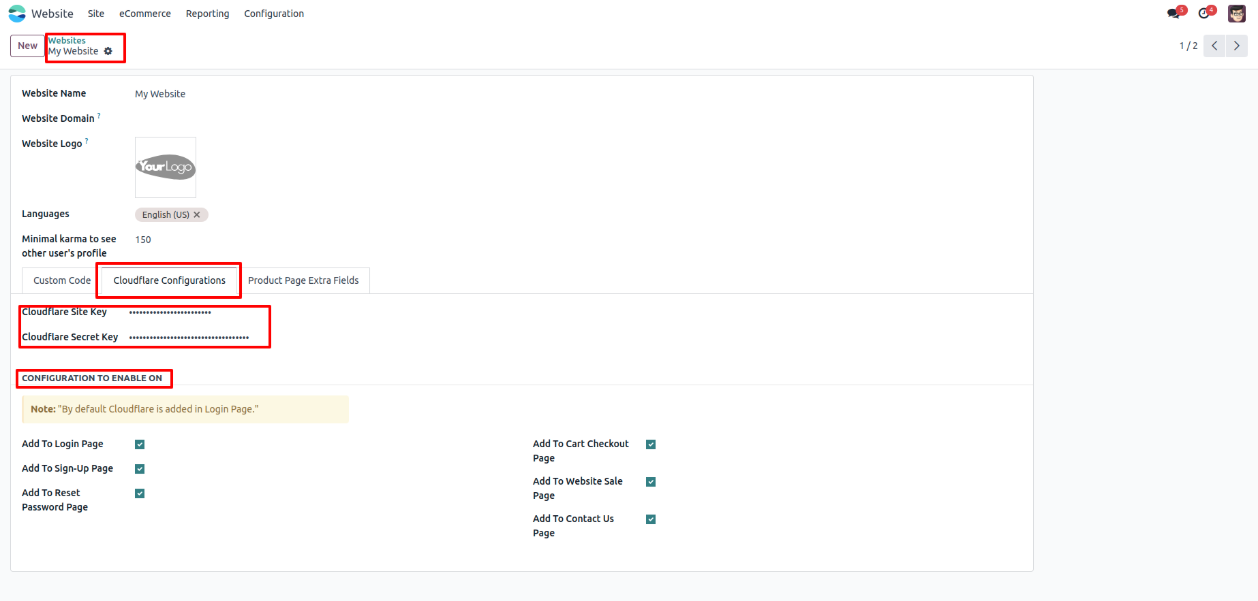
The Creyox Odoo Cloudflare Integration extends Odoo 18.0's website configuration with a dedicated Cloudflare Configuration page, accessible directly from Website → Configuration → Websites. Once a website record is opened, the Cloudflare Configurations tab is available where administrators enter their Cloudflare Site Key and Secret Key both displayed with hidden characters for credential security. A system note on the page confirms that the login page has Cloudflare verification enabled by default.
This Odoo Cloudflare connector gives administrators complete per-page control through a set of boolean toggles on the same configuration page covering the login page, signup page, reset password page, product detail pages, cart summary, and contact forms. Each toggle can be switched independently without any code changes. For website pages not covered by the default toggles, the module includes a drag-and-drop Snippet that can be added to any custom page in the Odoo website builder to place a Cloudflare CAPTCHA block exactly where it is needed. Once credentials are saved and the page toggles are enabled, Cloudflare verification is immediately active on all selected pages presenting human verification challenges to visitors before form submissions are processed.
Hot Features
◆ Separate Cloudflare Credential Page.
◆ Easy to apply Cloudflare to different pages.
◆ Note for default selected page.
◆ Hidden character for Credential.
◆ Boolean to control Cloudflare block.
◆ Extra security level.
◆ Snippet for captcha in website page.
Features
◆ User can configure the Credential of cloudflare from Cloudflare Configuration page of website.
◆ Easily check the boolean for the page where cloudflare need to be shown.
◆ Note that gives message regarding the default selected pages.
◆ Hidden character for the secret key and site key.
◆ Easy adding Snippet for captcha block in website page.
Work Flow
◆ User need to navigate to Website >> Configuration >> Websites and select website.
◆ Further user need to open a website record and there user will a page Cloudflare Configurations.
◆ Here in these page user will see Note message that says default Login page has cloudflare enabled.
◆ Also, there are 2 fields for secret key & site key and some boolean options in which page cloudflare need to be enabled.
◆ Here is a total flow how the cloudflare is shown in pages & how it works.