It’s Monday morning, and a production manager opens the spreadsheet for the company’s best-selling product. There are three versions of the bill of materials (BOM), and nobody is sure which one is current. By Thursday, my job will stop because one part has run out.
If that sounds familiar, you are probably shopping for an ERP for small manufacturers. Which one is “best” depends on your business, so this guide gives you a way to decide. First, what to look for in any ERP. Then, how Odoo’s manufacturing features, as described in the official Odoo 20 release notes, line up with messy BOMs and stock problems. No ERP removes these problems on its own, and we’ll be clear about what software can and can’t do.
What “BOM Chaos” and Stockouts Really Look Like
A BOM is a recipe card for a product. It lists every component and how much of each you need. Here is an analogy: if three cooks each keep their own copy of a recipe, the dish tastes different every time.
In a small manufacturer, the signs are easy to spot. The BOM in the office doesn’t match the one on the shop floor. A component is changed in one place but not another. The stock on paper doesn’t match the stock on the shelf. Purchasing hears about a shortage when it’s already too late.
Here is a fictional illustration. Imagine a small workshop that makes wooden chairs. The office BOM says four screws per chair, but the shop floor uses six, because a part was changed last month. Purchasing orders for four. Nobody did anything unusual, and the screws still ran out. The information simply didn’t match.
Why BOM Problems and Stockouts Feed Each Other
Our view is that a stockout often starts as a data problem. A wrong quantity or a missing component on a BOM means you order the wrong amount. Inaccurate stock counts then hide the mistake until a part is gone.
That is why fixing only one side rarely works. Better reordering won’t help if the BOM is wrong, and a clean BOM won’t help if the stock numbers can’t be trusted. A good ERP puts both in one place, but it can’t fix your data for you.
What to Look for in an ERP for Small Manufacturers
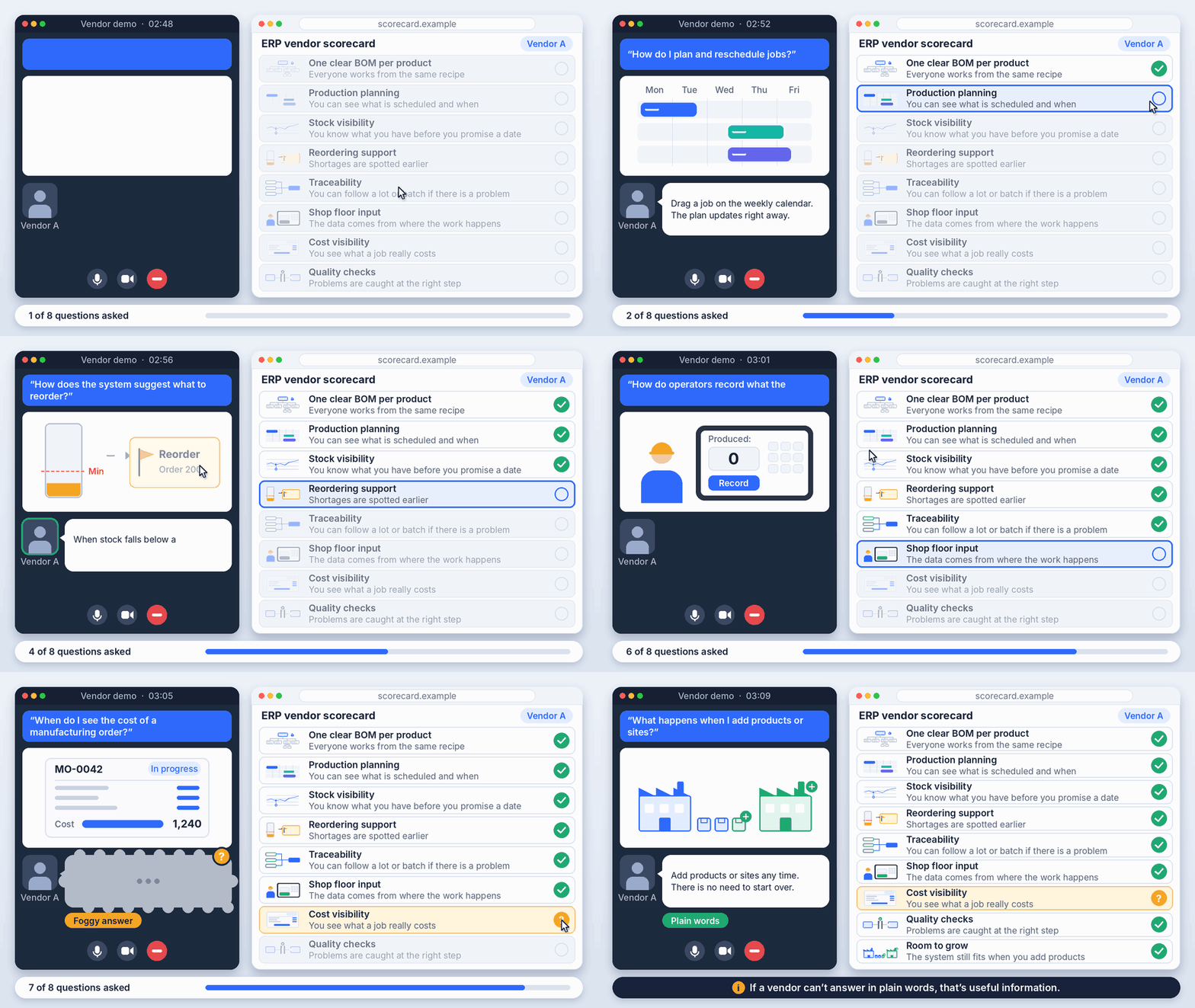
These criteria apply to any ERP, so use them with every vendor you talk to.
How Odoo MRP Helps With BOM Chaos
The release notes describe several changes that matter for BOMs. For each one, we give the facts, why it helps, and what to check in your own setup.
Components and sub-assemblies from one place
The release notes say you can view and manage a BOM’s components and sub-assemblies directly from the BOM form. Our reading is that this makes the BOM the single place people look, which supports the “one recipe” goal.
Finding where a component is used
The “Used In” button on the product form now shows the BOM component lines, which the notes say simplifies component replacement. If a supplier discontinues a part, you can see which BOMs use it before you change anything.
Comparing BOMs
The notes say you can compare BOMs based on the product quantities used. This helps when two versions of a product differ slightly and you need to see exactly where.
Extra costs on the BOM
You can register extra costs for a manufacturing order on the BOM form. This keeps costs like these next to the recipe, not in a separate sheet.
Flexible consumption is now the default
This one needs care. The release notes say the flexible consumption setting was removed from BOMs, and all manufacturing orders now use flexible consumption by default. If your production controls depend on strict consumption, review how you handle it before you move.
Tracking BOM changes with PLM
The PLM section of the notes mentions BoM comparison and a universal ECO report showing all BOM changes in one report, with cost comparisons.
How Odoo Helps You See and Plan Around Stockouts
None of these features stops a stockout by itself. They give you visibility and a way to plan, and they depend on accurate stock and BOM data.
- Suggested reordering levels. The notes say minimum and maximum stock levels are suggested from demand history, desired minimum days of coverage, and order frequency. It is a starting point to review, not a number to accept blindly.
- One “Order” button. The replenishment dashboard now has a single “Order” button, and the manufacturing overview has a “To Replenish” filter, so you can see what needs attention.
- Component status on manufacturing orders. The redesigned Kanban view shows component status, the active work center, the deadline, and remaining time. You can spot a job waiting on parts at a glance.
- Late purchase orders. If you miss the order deadline, the notes say you can recalculate expected arrival dates in one click. You can also edit the expected arrival date while the vendor’s original date stays on record.
- Stock aging report. The notes mention a stock aging report from the Moves Analysis view, which helps you spot stock that has been sitting.
Day-to-Day on the Shop Floor
A few changes in the notes affect daily work on the floor:
- Continuous production. Produced quantities can be recorded on work orders, and later operations can start once some quantities are ready.
- Split and backorder planning. You can split an ongoing manufacturing order to produce the rest later, and backorders of planned productions are planned automatically.
- Work order views. There are work order Kanban and Gantt views with drag-and-drop planning, and work orders can be processed in blocked work centers.
- One “Produce” button across Manufacturing, Shop Floor, and Barcode.
- Work center barcode. Scan a work center’s barcode to select it. A Shop Floor demo sheet lets you try the barcode features.
Is Odoo Right for Your Small Manufacturing Business?
Our opinion: it may suit you if you have real BOMs, you want stock, purchasing, and production in one system, and someone in your team will own the data.
Look harder if your operation is very simple, with few or no BOMs, or if you have special requirements that standard features may not cover. In that case, ask how much would need to be customised before you commit. And if nobody will own the BOM and stock data, no ERP will help much.
Before You Start: A Simple Readiness Checklist
This is general best practice, not an Odoo process.
- Clean up your BOMs first, so each product has one correct version
- Count your stock accurately before you load it
- Decide who owns BOMs and who owns stock data
- List your products and sub-assemblies
- Plan training for your team before go-live
- Start with one product line, not the whole business
Final Thoughts
No ERP removes BOM problems or stockouts on its own. What a good one gives you is one version of the truth and earlier warning when something is short. Odoo’s manufacturing and inventory features, as described in the release notes, are aimed at exactly that.
Start with clean data, one product line, and a clear owner. Then you can judge the system on your own business, not on a promise. If you’d like to talk through how Odoo could fit your production, Creyox can help with Odoo implementation for your business. Get in touch and we’ll look at your setup together.
Frequently Asked Questions
It depends on your products, size, and processes. Look for clear BOMs, production planning, stock visibility, reordering support, and room to grow. Test each option against your own workflows, not a general ranking.
It may be, if you have BOMs, want stock and production in one system, and have someone to own the data. Check the features against your own processes before deciding.
A bill of materials (BOM) is a list of the components and quantities needed to make a product, like a recipe card. Manufacturing orders use it to know what is required.
It gives you visibility and planning tools, such as suggested reordering levels and component status on manufacturing orders. They help you spot shortages earlier, but they depend on accurate stock and BOM data.
The release notes don’t say which edition includes each feature. Ask your Odoo partner which edition covers the features you need, such as PLM, before you plan.